Ya know, for a supposed “Web Geek”, I can be pretty slow on the uptake sometimes. I have heard about “RSS Feeds” for years , but the way it’s been described, it just sounded like something only Techno-ÜberNerds would be interested in.
“You need a news aggregator, application, ping this, dilithium crystal flux capacitor… blah, blah, blah…”
*Yawn*…
Anyway, for us English-speaking folks that doesn’t have every episode of Star Trek memorized…
Recently, I have learned there are a whole lot of uses for everyone with RSS Feeds. Mainly, it can save you a lot of time and only visit a site when there’s something new and interesting. It’s great, especially if you are a very busy person, and/or or have blogging friends scattered everywhere.
So here is how to bookmark “Live Content”. You can not only do it with *my* RSS feeds, but any other sites that offers feeds as well.
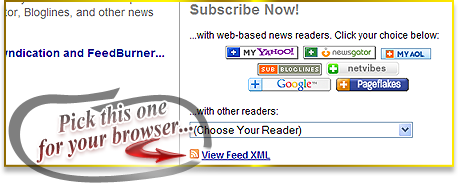
STEP ONE: Go to the RSS Page…
 Subscribe to EricBrooks.Com via RSS Feeds
Click on any one of the feeds that may interest you…

You have the option to put them on your Google Page (or Google Reader), or MyYahoo, but what we want is to bookmark it in our browsers… Firefox appears to be the most popular browser these days, according to recent stats, so I will mainly focus on that in here..
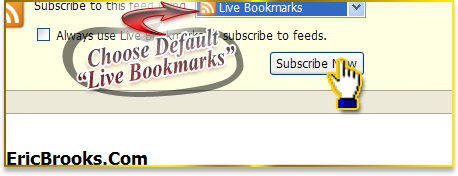
STEP TWO: Subscribe with “Live Bookmarks” (Firefox)…
- With Chrome, add it to your Google Reader.
- With Safari, click on the “RSS” button in the address bar, and then click on “Actions:” > “Add Bookmark” on the lower right side, and view in your toolbar.
- With Internet Explorer, click on the RSS Icon
 in the right side of your toolbar and subscribe, and then view it in your “Feeds” tab in “Favorites”… but does anyone even use IE anymore???
Keep it on the default “Live Bookmarks” and press the “Subscribe Now” button…
STEP THREE: Find the feed in your bookmarks… In your Firefox Bookmarks (And you can save it anywhere in your bookmarks, actually. It’s best to keep all your favorite reads in one spot.), you’ll find a special icon for feeds, and in that, a full list of items…
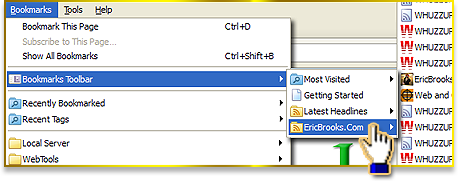
You can see by the icons what is fresh content or what you have visited already…

Like I said, you can not only do that with this site, but other sites you like that offer RSS Feeds. It’s the way the web is going now, with content and information flying shorter and faster.
Don’t forget to subscribe to my feeds, ok? 😉

Eric Brooks
Musician, Programmer, Graphic Designer, Evil Clown - A thorn in the Internet's side since 1997 with no intention of stopping any time soon.
Follow Me: